


What is IncrediMail? How does it compare to Outlook?
 Most email applications look pretty much the same: business-like, locked on efficiency and offering 0% fun. On the one hand, these are positive factors that will help you stay focused, help avoid distraction by unnecessary bells and whistles and will keep productivity on a high level. On the other hand, if you don’t care much of all this and are just looking for an email program that’s a pleasure to use on a day-to-day basis, you might want to take a look at IncrediMail, and especially its second, most recent version. So if you don’t yet know the answer to the question “What is IncrediMail?”, you should go ahead and give it a try – the program is absolutely free. This email tool is different from conventional email applications in a number of ways. So, what is IncrediMail?
What is IncrediMail?

IncrediMail is a good alternative to conventional email clients that combines fun, ease of use and a set of really cool features, such as customizable event-specific animations, an ability to assign photos and clipart images to contacts, support of interface skins and a lot more. In simple words, Incredimail is the right email client for anyone looking to spice up their email exchange and enjoy the very process of sending and receiving emails. “What is IncrediMail?” is the question that many people ask upon hearing the name of this email client, since it’s not yet as popular as MS Outlook. However, despite being a generally very well-rounded product, IncrediMail is not for everyone. Quite a lot of people are already using IncrediMail and are looking for a way to move their messages, contacts and other items to Outlook to continue working in a more business-like manner (what is IncrediMail for a corporate user, after all?) or for reasons unrelated to any aspect of IncrediMail’s functionality – for example, because of corporate email standards.
What do IncrediMail letters look like?
 IncrediMail is fairly unique in how it interacts with the user and how IncrediMail letters look. The latest version of the program features brand new and totally reworked design, a possibility to use personal display pictures, a possibility to assign personal contact icons to people on your contacts list, tons of new event animations, live notifications, program skins and many more nice features that make IncrediMail letters look different and make your daily emailing tasks a lot more exciting. Email animations fill regular emails with fun and make you want to reply in the same manner right away. Forget your ASCII skills – IncrediMail letters can be made truly expressive using real graphics and animations, not multi-storey hard-to-type smileys. So as you see, IncrediMal letters really make a difference and make email communications both efficient and fun.
What if I download IncrediMail and then decide to switch to an alternative email client?
If you download Incredimail, use it for some time and eventually decide that this program is exactly what you need right now, you can always transfer all of your emails to another email client, such as Microsoft Outlook. The method of this migration depends on the version of Incredimail you use, so if you download IncrediMail 1.0, you will need to use one set of tools (such as MBOX Extractor and Outlook Import Wizard) and if you download IncrediMail 2.0, you can get the job done using other utilities and methods. Although a data migration sounds like a risky endeavor, don’t worry about the safety of your emails. All you need is a professional email conversion and import tool like Incredimal to Outlook Converter and some time!
IncrediMail email transfer – possible scenarios.
There are several tried and tested approaches to transferring IncrediMail email to other email clients. The choice of the right method depends on the version of IncrediMail that you use.
Here are some of the possible solutions:
- 1) You can send all of your IncrediMail email to an external email address that you have access to. Once done, you can relatively easily export your messages to Outlook. Please note, however, that all of the emails you will export will have you listed as the sender, which may be inconvenient for searching for specific information in the future.
- 2) If you are using Incredimail 1.0, you can use one of the available *.mbox converters to convert Incredimail email to the *.eml format (we recommend using MBOX to EML Converter, a free tool that comes with Outlook Import Wizard). Once done, you can drag-n-drop EML files to Outlook Express (a free email client shipped with older versions of Windows OS) and then import your emails to an Outlook PST file. It’s a chain with a lot of elements, but it’s a reliable method of transferring IncrediMail email to Microsoft Outlook.
* – If you don’t have Outlook Express application installed at your system anymore (Vista, Windows 7) you may use the Outlook Import Wizard utility to import .EML files extracted from .MBOX data storages of IncrediMail v1.0.
Another method is rather resource-intensive and questionable, so it will mostly work for several messages only. If you have a year worth of messages, it’s not a good idea to use this method for IncrediMail to Outlook conversion.
The principle is as follows:
- 3) you can drag messages from IncrediMail, one by one, and drop them to a folder on your hard drive. The first message will be called email.eml, so you’ll need to rename it prior to proceeding with the second one. This simple algorithm will have to be repeated for each message you want to import. The resulting EML files can then be imported into Outlook.
Incredimail migration using IncrediMail to Outlook Converter
Finally, the most convenient tool for a full-scale IncrediMail migration is Incredimail to Outlook Converter. It allows you to avoid the difficulties associated with the methods described above and perform an Incredimail migration quickly and nearly effortlessly. All you need to do is to start the program, assists it with finding your Incredimail message and attachment folders, if necessary, and hit a single button. This will start the IncrediMail migration process that will extract all IncrediMail items and convert them into the proprietary PST format of Microsoft Outlook.
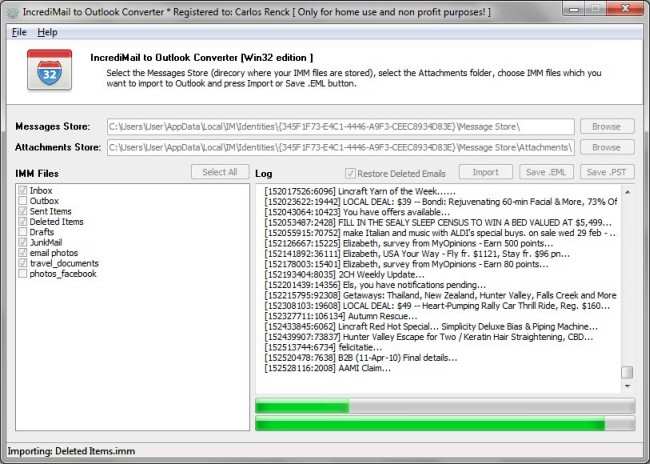

As you see, Incredimail to Outlook converter is the easiest and most reliable solution for complete Incredimail to Outlook migrations that require absolutely no knowledge of either of the formats or experience of such of similar migrations.
Thank you for sharing excellent information. Your website is so cool. I’m impressed by the details that you have on this web site. It reveals how nicely you perceive this subject. Bookmarked this web page, will come back for extra articles.
incredimail is the one of the best option when we are using an outlook mail.
A lots of option available here to decorate save design an email before sending a types of mail background design also available here to select accordingly….
thanks once again…Subhash
This website has some very helpful info on it. Cheers for helping me.
Great information deed, Incredimail is amazing and with the conversion kit to migrate my emails makes it even better!