


Migrating from IncrediMail to Outlook Express

 (6 votes, average: 4.17 out of 5)
 Loading...
 Although a lot of people consider Outlook Express to be a younger brother of MS Outlook with a limited set of features, this is not exactly true. In fact, these are two completely different applications that use their own data formats and have slightly different purposes. Both come from the same company and are intended for about the same target audience, but Outlook is traditionally used in corporate environments, while Outlook Express is mostly found on home PC’s. IncrediMail, however, is a strong alternative to both, offering tons of great features that can easily make your emails stand out and add a good deal of fun to your daily emailing activities: colorful backgrounds, animations, contact photos, personalization elements, 3D effects, sounds and more. Sometimes, though, users need to transfer their IncrediMail email to Outlook Express – and it suddenly becomes a problem, since there is no easy way of performing an IncrediMail to Outlook Express migration. Fortunately, IncrediMail to Outlook Express export can be accomplished with the help of alternative methods, both manual and automated, so if you are looking for a reliable, safe and hassle-free way of performing an IncrediMail to Outlook Express message transfer, keep on reading. Moving your vast archive of emails and attachments from IncrediMail to Outlook Express is easier that you think!
Choosing the right Incredimail converter
(3 votes, average: 5.00 out of 5)Loading...IncrediMail is a popular email client featured in a number of Hollywood movies as an alternative to regular rather boring, formal and business-like email tools. Millions of people have preferred IncrediMail to other email clients: from students and housewives to office workers and the creative public. IncrediMail offers tons of great features that make everyday communication look and feel different: customizable email backgrounds, animations, emoticons, individualization of the contacts list, animated and photo notifiers, a powerful greeting card generator and a lot more! IncrediMail emails do look different and it wasn’t left unnoticed by millions of users who wanted a brand-new email tool. However, not everyone needs the bells and whistles of IncrediMail – and some people simply cannot use the program because it doesn’t comply with corporate standards. The solution to this problem is an IncrediMail converter capable of quickly converting IncrediMail messages to a proper format and copying them to the necessary program. As a rule, companies use Microsoft Outlook as a standard email exchange, collaboration and scheduling solution and that’s where most IncrediMail email messages end up being moved to. The choice of the right IncrediMail converter may not be easy, since there are so many alternatives on the market, but it’s the most important ingredient of this transition, since only a high-quality IncrediMail converter can ensure accurate and hassle-free migration of your email. Below are some insights into the IncrediMail to Outlook conversion process that will help you get a better idea of what a decent IncrediMail converter should be able to do.
How to prevent the IncrediMail to start automatically
 (3 votes, average: 4.67 out of 5)Loading...
Question: How to prevent the IncrediMail to start automatically with Windows? It is very annoying when the program stats with your Windows OS and taking system resources. I just installed it and have no any chance to disable the autostart during the IncrediMail setup.
Answer: IncrediMail as the most other programs can be widely configured. The option called “Launch IncrediMail on startup” is also available.

Disable this option
Switching from IncrediMail to Outlook: Why and When?
(4 votes, average: 4.00 out of 5)Loading...IncrediMail was created as a fun alternative to conventional email clients, strict and businesslike. The program finally allowed users to create expressive and colorful messages, change their background color, use handwritten signatures and do a lot more to make email unique, entertaining and different from their regular counterparts. IncrediMail also made it possible to add icons and photos to contacts in the address book, use various animations and effects, and quickly preview attachments. These are just some of the features of IncrediMail, but the overall idea is clear – it’s a fun-to-use and good-looking email client. However, IncrediMail is not quite suitable for corporate use and it creates a serious problem for users that are currently using it, but have to switch to the king of the corporate email world, Microsoft Outlook. IncrediMail to Outlook conversion is a fairly simple process, which, however, is not possible without proper tools. Unfortunately, you cannot simply copy message files from IncrediMail to Outlook, since these programs store data in completely different formats. IncrediMail to Outlook migration covers messages and attachments and can usually be completed within minutes. However, before you attempt to perform the transfer on your own, you should know the basic principles of IncrediMail to Outlook conversion.
Reasons for Performing an IncrediMail Migration
(4 votes, average: 4.25 out of 5)Loading...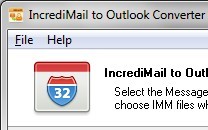 In the world of email clients, most of them do their best to imitate the well-known leaders in every possible aspect. And that is probably why most of them are so business-like, serious and plain dull to use at home. However, there are some exceptions to this rule – IncrediMail, for instance. This email product was initially meant to be an alternative to regular email clients and was developed to bring more fun, more colors and more emotions to day-to-day email communications. IncrediMail has tons of great features: from a wide choice of emoticons and message backgrounds to email animations, easy and fast photo sharing, a built-in e-card generator and a convenient toolbar. However, these features are mostly intended for home users and can hardly be used in a business environment. This is exactly why so many devoted IncrediMail users decide to switch to alternative email applications, such as Outlook, and perform IncrediMail migration. IncrediMail migration is a process whereby all IncrediMail messages are converted into the Microsoft Outlook PST format. Due to the complete incompatibility of formats used by both applications, IncrediMail migration and conversion cannot be avoided. Possible IncrediMail migration scenarios will be described in detail later in this article.
Why would I need an IncrediMail backup at all?
(4 votes, average: 4.75 out of 5)Loading...Creating an IncrediMail backup copy in Outlook.
As an active user of IncrediMail, you may be quite happy with the features offered by the program and the way its messages look. However, there may come a moment when you may want to copy your message archive to a more serious email application, such as Microsoft Outlook, for this or that reason. First and foremost, you may want to be able to use some of your IncrediMail messages at work or create an IncrediMail backup copy of your home email archive on a different computer. Although this is not exactly an IncrediMail backup operation in the conventional sense of the phrase, it still fulfills the primary goal of any backup – saves your data and email messages in a different place to prevent its loss or damage in case of a local data corruption incident. Once your IncrediMail backup is completed, your messages will be a lot safer in a protected corporate environment. This method of IncrediMail backup requires a minimum of skills and can be used by anyone who has the right tool.