


When do I need IncrediMail email recovery?


 (6 votes, average: 3.83 out of 5)
 Loading...
 The answer to this question lies on the surface – you need IncrediMail email recovery when something goes seriously wrong with your hard drive, file system, IncrediMail installation folder or IncrediMail files themselves. You need it when a message you’ve had in your inbox for ages is suddenly gone after a computer problem of any sort. And, of course, you need IncrediMail email recovery when your IncrediMail won’t start at all, mentioning a problem with its storage files. Since IncrediMail stores its messages in IMM files and each of them can contain a nearly unlimited number of messages, any damage caused to such a file may have unpredictable consequences – from lost messages to total disability to start the program. IncrediMail data can be damaged on different levels – from the physical hard drive level (worst-case scenario) to the level of internal IMM file structure, which can be relatively easily fixed with corresponding tools. Sometimes, the need for IncrediMail email recovery is caused by the corruption of an index file that ties all of the data together, and this is also a case with some clear solutions that you can use. If your IncrediMail has suffered a crash and some or all of your messages are now missing, read along to find out how to perform IncrediMail email recovery and restore your emails!
How to restore IncrediMail email messages?
 The shortest route to getting your IncrediMail email messages back is to contact a professional recovery service. Although an undoubtedly viable option, it will not work for all users and in all situations, since it usually takes a fair deal of time to analyze the market, find a decent service, contact them, agree on the terms of service, send your damaged files over to them and wait for the result. As a rule, when it comes to IncrediMail email recovery, time is of essence, since a lost message can delay a sale, signing of a contract or another business-critical activity. Therefore, the best solution is to have a reliable software tool that will save you the trouble of doing all of the above. Such applications are usually small, affordable, quite self-explanatory and enable you to either fix the index file to make your messages visible to IncrediMail again or extract Incredimail email messages directly from storage files. If your ultimate goal is the migration of your IncrediMail email to another email client, some recovery tools can offer fast and hassle-free conversion of recovered messages to a corresponding format. Whatever your case is, the very nature of the IncrediMail email storage format and the default functionality of IncrediMail will not allow you to tackle a data corruption problem on your own and without using specialized tools.
A tool that will help you recover damaged email in no time
IncrediMail to Outlook Converter is one of those tools that allow you to restore recover damaged emails in IncrediMail and automatically convert them to Microsoft Outlook or export them into the EML format for further conversion and exporting to any suitable applications. The program requires absolutely no third-party libraries or components, and you don’t even need to have IncrediMail installed on your PC. A damaged IncrediMail file or files, IncrediMail to Outlook Converter and, optionally, Outlook are the only components needed to recover damaged files (.IMM) of IncrediMail. The software has an extremely compact size (a few seconds of download on an average broadband connection), features a super-intuitive interface and a friendly recovery wizard that is very easy to follow. The program is such a no-brainer that even complete novices will have no problems with it and will be able to recover damaged .IMM files in minutes. Most of the program’s functionality is hidden from the user, so it only requires the user to specify the source file, the preferred destination for recovered emails and a couple of other non-mandatory parameters that may well be left unchanged. IncrediMail to Outlook Converter is a perfect solution for ad hoc IncrediMail recovery that will come to rescue when you need it most of all. With this handy little tool at hand, you can finally recover damaged .IMM files on your own and forget the hassle of dealing with third parties, losing time and money on activities that may be done in-house.
The process of recovering your IncrediMail data
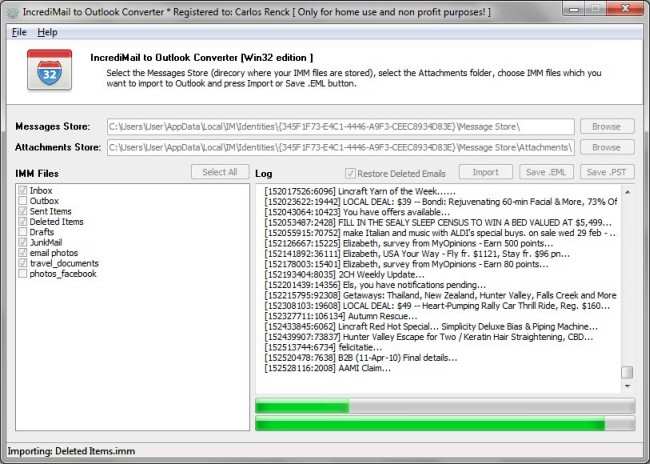
As mentioned above, the process of recovering IncrediMail data is broken into a short series of steps within a convenient wizard. IncrediMail to Outlook Converter allows you to recover IncrediMail data and immediately export the messages to Outlook or save them as *.eml files that can be imported into IncrediMail by drag-n-drop.
Below is a step-by-step instruction for recovering your damaged IncrediMail data:
- Start IncrediMail to Outlook Converter. In case IncrediMail is currently installed on your PC, the program will automatically find the folders with your damaged message files and fill out the corresponding fields on the first page of the wizard. If you have the damaged files stored elsewhere, you will need to manually specify their location using a standard dialog.
- Select the IncrediMail IMM storage files that you believe are damaged from the list in the left part of the program window.
- Choose the recovery method the program should use. If you want to convert the recovered IncrediMail data directly to Outlook, make sure that it’s not running at the moment and click the “Import” button. If you only need to save the messages in the EML format, use the “Save .EML” button. This will open a standard folder selection dialog. Select a destination folder for the files and confirm your selection.
Note that IncrediMail to Outlook Converter creates a separate folder for each IMM storage file selected initially and fills each of them with corresponding recovered messages. - If you chose to convert the recovered IncrediMail data to Outlook, you can now start it to see your messages in place. If you converted your recovered messages to the EML format, open the previously selected destination folder. You can now drag-n-drop emails back to IncrediMail or use them otherwise (for instance, import them into any other client supporting EML).
This concludes the recovery of damaged IncrediMail data. As you could see, it only takes a few mouse clicks and several minutes of your time to accomplish this seemingly complex task.
Deleted email recovery made easy
Apart from restoring Incredimail messages damaged by all sorts of incidents, IncrediMail to Outlook Converter is also capable of performing deleted email recovery. This means that the program can undelete accidentally deleted messages or messages that lost their importance and were deleted in the past, but are urgently needed at the moment. The procedure for deleted email recovery is identical to that for the recovery of damaged files. Deleted email recovery becomes possible thanks to the fact that IncrediMail does not physically delete messages, but keeps them in the same IMM files all regular messages are stored in. The deleted email recovery feature makes the program one of the few solutions on the market that combine the Incredimail to Outlook conversion functionality with two recovery options – recovery of messages from damaged IMM files and recovery of deleted IncrediMail messages.
My computer recently crashed and this is exactly what I needed to recover my emails, thanks!